> ## Documentation Index
> Fetch the complete documentation index at: https://docs.kong.fyi/llms.txt
> Use this file to discover all available pages before exploring further.
# Setup Wizard
> Walk through kong setup step by step — providers, API keys, custom endpoints, and what gets saved.
The `kong setup` command is an interactive wizard that configures your LLM providers and verifies your environment. You only need to run it once, but you can re-run it anytime to change your configuration.
```bash theme={null}
kong setup
```
## Step 1: Choose Your Providers
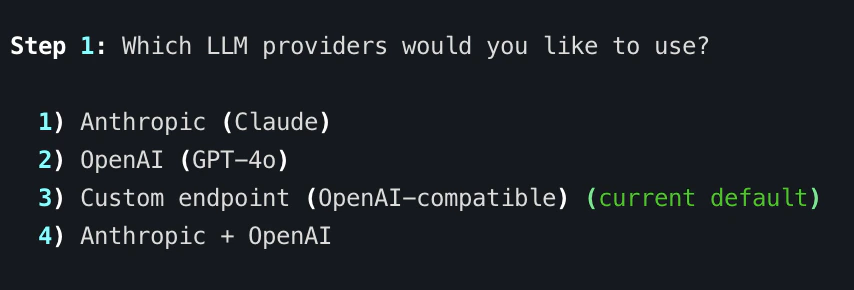
The wizard starts by asking which LLM providers you want to use:
```
Step 1: Which LLM providers would you like to use?
1) Anthropic (Claude)
2) OpenAI (GPT-4o)
3) Custom endpoint (OpenAI-compatible)
4) Anthropic + OpenAI
```
| Provider | Default Model | Setup |
| ------------- | ----------------- | ----------------------------------------------- |
| **Anthropic** | `claude-opus-4-6` | Set `ANTHROPIC_API_KEY` env var |
| **OpenAI** | `gpt-4o` | Set `OPENAI_API_KEY` env var |
| **Custom** | User-specified | Configure via `kong setup` or `--base-url` flag |
If you have previously run setup, the wizard shows which providers are currently enabled and which is the default.
 ## Step 2: API Key Verification
For standard providers (Anthropic and OpenAI), Kong checks whether the corresponding environment variable is set:
* `ANTHROPIC_API_KEY` for Anthropic (Claude)
* `OPENAI_API_KEY` for OpenAI (GPT-4o)
If a key is found, the wizard displays a masked preview (e.g., `sk-ant-...abcd`). If a key is missing, it shows you exactly where to get one and the export command to set it.
Kong reads API keys from environment variables, not from the config database. Set them in your shell profile (`~/.zshrc` or `~/.bashrc`) so they persist across sessions. The wizard verifies they are present but does not store them.
## Custom Endpoint Configuration
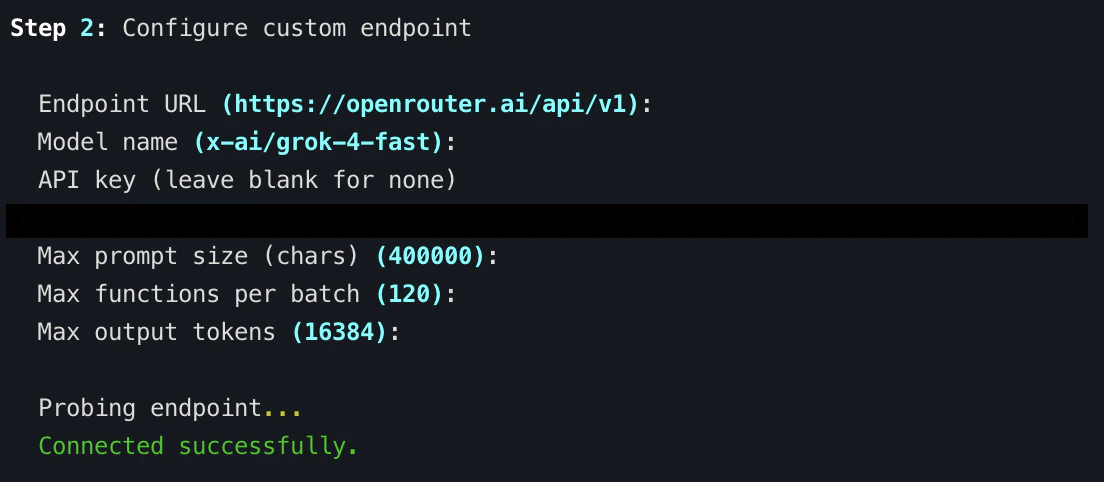
If you choose option **3** (Custom endpoint), the wizard walks you through configuring an OpenAI-compatible endpoint. This works with local inference servers and third-party providers:
| Field | Description | Examples |
| --------------------------- | -------------------------------------------------- | -------------------------------------------------------------------------------------------------------------------- |
| **Endpoint URL** | Base URL of the OpenAI-compatible API | `http://localhost:11434/v1` (Ollama), `http://localhost:8000/v1` (vLLM), `https://openrouter.ai/api/v1` (OpenRouter) |
| **Model name** | The model identifier to use | `llama3.1`, `deepseek-coder`, `anthropic/claude-3.5-sonnet` |
| **API key** | Authentication key (leave blank for local servers) | — |
| **Max prompt size** | Maximum prompt size in characters | Default from built-in limits |
| **Max functions per batch** | Maximum functions analyzed per LLM call | Default from built-in limits |
| **Max output tokens** | Maximum tokens in LLM response | Default from built-in limits |
After you enter the endpoint details, Kong probes the endpoint to verify connectivity. If the server is not running, it saves your config anyway — you can start the server later.
## Step 2: API Key Verification
For standard providers (Anthropic and OpenAI), Kong checks whether the corresponding environment variable is set:
* `ANTHROPIC_API_KEY` for Anthropic (Claude)
* `OPENAI_API_KEY` for OpenAI (GPT-4o)
If a key is found, the wizard displays a masked preview (e.g., `sk-ant-...abcd`). If a key is missing, it shows you exactly where to get one and the export command to set it.
Kong reads API keys from environment variables, not from the config database. Set them in your shell profile (`~/.zshrc` or `~/.bashrc`) so they persist across sessions. The wizard verifies they are present but does not store them.
## Custom Endpoint Configuration
If you choose option **3** (Custom endpoint), the wizard walks you through configuring an OpenAI-compatible endpoint. This works with local inference servers and third-party providers:
| Field | Description | Examples |
| --------------------------- | -------------------------------------------------- | -------------------------------------------------------------------------------------------------------------------- |
| **Endpoint URL** | Base URL of the OpenAI-compatible API | `http://localhost:11434/v1` (Ollama), `http://localhost:8000/v1` (vLLM), `https://openrouter.ai/api/v1` (OpenRouter) |
| **Model name** | The model identifier to use | `llama3.1`, `deepseek-coder`, `anthropic/claude-3.5-sonnet` |
| **API key** | Authentication key (leave blank for local servers) | — |
| **Max prompt size** | Maximum prompt size in characters | Default from built-in limits |
| **Max functions per batch** | Maximum functions analyzed per LLM call | Default from built-in limits |
| **Max output tokens** | Maximum tokens in LLM response | Default from built-in limits |
After you enter the endpoint details, Kong probes the endpoint to verify connectivity. If the server is not running, it saves your config anyway — you can start the server later.
 ## Default Provider Selection
If you enable multiple providers (option **4** — Anthropic + OpenAI), the wizard asks which one should be the default:
```
Step 3: Which provider should be the default?
1) Anthropic (Claude)
2) OpenAI (GPT-4o)
```
The default provider is used when you run `kong analyze` without a `--provider` flag. You can always override it per-analysis:
```bash theme={null}
# Uses your default provider
kong analyze ./binary
# Override for this run
kong analyze ./binary --provider openai
```
## Ghidra Detection
After provider configuration, the wizard checks for a Ghidra installation. Kong auto-detects Ghidra in common locations. If found, it displays the path. If not, it provides installation instructions:
```
Ghidra
Found: /opt/homebrew/Caskroom/ghidra/11.3.1/ghidra_11.3.1_PUBLIC
```
If Ghidra is installed in a non-standard location, set the `GHIDRA_INSTALL_DIR` environment variable:
```bash theme={null}
export GHIDRA_INSTALL_DIR="/path/to/ghidra"
```
## What Gets Saved
The setup wizard saves your configuration to a SQLite database at:
```
~/.config/kong/config.db
```
This location can be overridden with the `KONG_CONFIG_DIR` environment variable.
The database stores:
* **Enabled providers** — which providers are available for analysis
* **Default provider** — which provider to use when no `--provider` flag is given
* **Custom endpoint config** — base URL, model name, API key, and limit overrides (if configured)
* **Setup completion flag** — so Kong knows the wizard has been run
API keys are **not** stored in the config database. They are always read from environment variables at runtime. This keeps secrets out of the config file.
## Re-Running Setup
You can re-run `kong setup` at any time to change providers, switch defaults, or update custom endpoint settings. The wizard shows your current configuration and lets you reconfigure everything.
## Next Steps
* **Run your first analysis** — Head to the [Quickstart](/getting-started/quickstart)
* **Configure providers in detail** — See [LLM Providers](/configuration/llm-providers) and [Custom Endpoints](/configuration/custom-endpoints)
* **Explore all environment variables** — See [Environment Variables](/configuration/environment-variables)
* **CLI reference** — See [`kong setup`](/reference/cli/setup) for flags and options
## Default Provider Selection
If you enable multiple providers (option **4** — Anthropic + OpenAI), the wizard asks which one should be the default:
```
Step 3: Which provider should be the default?
1) Anthropic (Claude)
2) OpenAI (GPT-4o)
```
The default provider is used when you run `kong analyze` without a `--provider` flag. You can always override it per-analysis:
```bash theme={null}
# Uses your default provider
kong analyze ./binary
# Override for this run
kong analyze ./binary --provider openai
```
## Ghidra Detection
After provider configuration, the wizard checks for a Ghidra installation. Kong auto-detects Ghidra in common locations. If found, it displays the path. If not, it provides installation instructions:
```
Ghidra
Found: /opt/homebrew/Caskroom/ghidra/11.3.1/ghidra_11.3.1_PUBLIC
```
If Ghidra is installed in a non-standard location, set the `GHIDRA_INSTALL_DIR` environment variable:
```bash theme={null}
export GHIDRA_INSTALL_DIR="/path/to/ghidra"
```
## What Gets Saved
The setup wizard saves your configuration to a SQLite database at:
```
~/.config/kong/config.db
```
This location can be overridden with the `KONG_CONFIG_DIR` environment variable.
The database stores:
* **Enabled providers** — which providers are available for analysis
* **Default provider** — which provider to use when no `--provider` flag is given
* **Custom endpoint config** — base URL, model name, API key, and limit overrides (if configured)
* **Setup completion flag** — so Kong knows the wizard has been run
API keys are **not** stored in the config database. They are always read from environment variables at runtime. This keeps secrets out of the config file.
## Re-Running Setup
You can re-run `kong setup` at any time to change providers, switch defaults, or update custom endpoint settings. The wizard shows your current configuration and lets you reconfigure everything.
## Next Steps
* **Run your first analysis** — Head to the [Quickstart](/getting-started/quickstart)
* **Configure providers in detail** — See [LLM Providers](/configuration/llm-providers) and [Custom Endpoints](/configuration/custom-endpoints)
* **Explore all environment variables** — See [Environment Variables](/configuration/environment-variables)
* **CLI reference** — See [`kong setup`](/reference/cli/setup) for flags and options